Buy

Buy

List of Posts

Get this widget
To get notifications, Please like our Facebook Page >>>>>>

Use Search box to find a topic in this Blog!!!

Showing posts with label Real Time Scenarios. Show all posts

Time stamp error

Reason
  • The “Time Stamp” Error occurs when the Transfer Rules or Transfer Structure are internally inactive in the system.
  • They can also occur whenever the DataSources are changed on the R/3 side or the DataMarts are changed in BW side. In that case, the Transfer Rules is showing active status when checked. But they are actually not, it happens because the time stamp between the DataSource and the Transfer Rules are different.


Solution 
1. Go to RSA1 --> Source system --> Replicate DataSource


2. Run the program RS_TRANSTRU_ACTIVATE_ALL


3. Mention Source System and InfoSource and then execute.


Now the Transfer Structure will be automatically activated then proceed with the reload, it will get success now.

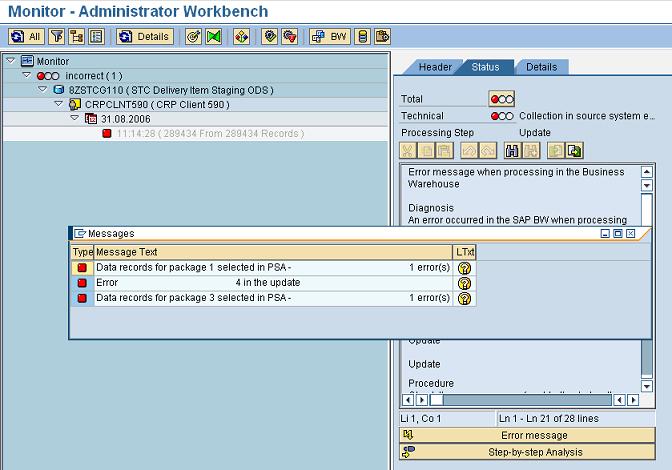
PSA error record

Reason
It may happen some times that the incoming data to BW is having some incorrect format, or few records have few incorrect entries. 


Solution
1. Go to details tab, find its packet number and its record number.


2.  Click on PSA icon in monitor and select the error Data Packet

3. Double click on error record and edit it to the correct value, Select Save.
Now update from PSA to target by selecting the option Start update immediately.

Error calling number range object


Solution

1. Note down the InfoCube and Dimension name.
2. Go to T-Code: RSRV --> All Elementary Tests --> Transactional Data then double click on “Comparison of Number Range of a Dimension and Maximum DIMID” --> then click the same on the right side pane --> Mention the InfoCube name and Dimension name, click on Transfer button --> Click on top Correct Error.

0calmonth(variable) in rows and columns

I have requirement like Query output QUANTITY should display based on given input 0calmonth variable


               MONTH1  MONTH2  MONTH3 MONTH4 MONTH5 MONTH6 MONTH7 MONTH8 MONTH9 MONTH10 MONTH11 MONTH12

MONTH1   12
MONTH2                  15
MONTH3
MONTH4                                              89
MONTH5
MONTH6    34                                                                                            98                                 32


In column i need 12 months as fixed and in rows 6 months.


Could please anyone suggest the possible way to this

Sol:

You can use Calmonth in both rows and columns. Bex will allow you f you do like below:--

Put Calmonth in rows pane.

Create 12 KFs and restrict with calmonth offset values. But one problem here is, rows will also show 12 months if you have data for all 12 months.

Analysis Process Brings no data

I have an ods an a query.Query sends data to ods via analysis process.Although I see the value of the key figure for each row in query ,when data is transferred to ods, the key figure value becomes 0.The key figure in ods and query are the same.What may be the problem?I map the key figure directly in the analysis process designer, there is no formula etc.There is no error, even no warning.

Sol:
It is a sequence problem i think. Please keep all hidden KFs at the end of the KF list, as APD doesnt recognize it and gives that value.

No data is being found while extracting data from 2LIS_08TRTLP

When I'm trying to extract data with selection TKNUM=existing TKNUM at VTTK table, no data records are being found.

Does any one have any idea?


Sol:

Try to delete setup table - LBWG and Re fill Setup table without any selections or with desired selctions using T code : SBIW or OLI*BW.

Then after Execute RSA3.

Sol: Have you run Setup tables filling for this Application?

You need to enter in both From and To values in RSA3.

DTP in Serial, not in Parallel

I've a big issue of performance and internal memory with a DTP load because in the transformation there's a complex end routine.  Now I'm facing a problem of internal memory while launching the DTP, this ends always in status red.  Now DTP is defined as "Serial Extraction, Immediate Parallel Processing".
I've checked this post: https://scn.sap.com/thread/2077132 and I cannot see other options for my DTP (from an InfoCube to an DSO), just that one, and the thing is that I think if DTP is launched as serial extraction and not in parallel my memory issue would be solved (not sure anyway). 

The help I need is how I can change the mode DTP works, because I just see two options, the one is defined right now: "Serial Extraction, Immediate Parallel Processing" and "debugging" one.

Sol:

It looks like you just want to set it to 1 parallel processes at a time, which is essentially serial loading.

You can change the number of processes in the Settings for Parallel Processing in the DTP. I believe the default (depending on your system) is 3. You can change the Number of Processes to 1, and should achieve your desired result.

Sol:
Have you defined Semantic Groups in the extraction tab of DTP? Please increase no. of parallel proceses in DTPsettings.

You cannot define the processing type in the Execute tab. The system gives you the option by based on source and target.
Go to DTP-->Go to all context menu items-->Batch settings will be there. go thee and add 5 and save it and execute the dtp

Processing mode is defined by the system based on your source.
Try the below option
From the DTP batch manager increase the no of parallel process and execute the DTP and check.


Issue getting values with DTP from InfoCube to DSO

I'm loading data from an InfoCube to an DSO.
In the InfoCube I have the following:
DOC_NUM     DOC_ITEM     KNART     VALUE
c.PNG 
 
In the DSO I need just values whose KNART = MWST.  In transformation I've tried by formula or by routine to do that condition:
Formula: IF(KNART='MWST',VALUE,")
Routine:
IF SOURCE_FIELDS-KNART = 'MWST'.
       RESULT = SOURCE_FIELDS-VALUE.
ENDIF.


But I'm always extracting this: value is not filled.
KNART field is not in DSO
d.PNG

Do you know what I'm doing wrong?

Sol:  End Routine is possible to do it calling directly to active data table for the source infocube.  However I'm not implementing this in my case because the scope of doing it in the direct transformation was to free the End Routine as it's a very complex one and I'm optimizing it to improve the performance.

So, after many tests and tries, I couldn't get the values as it was overwriting all the time to the last value = 0, even if putting sum in the transformation

Sol: You can simply create a Filter in the DTP between Cube to DSO. Keep MWST value in the KNART field in the filter. That's it, you will get the required data in the DSO. No routine is required in the transformation.

Sol:
You need a start routine here and not a field routine.

DELETE SOURCE_PACKAGE WHERE KNART NE 'MWST'.

Help with updated 2LIS_03_BF

 I have noticed that there are additional fields in 2LIS_03_BF in our current Business Content. 

1. Is it possible to install and utilize this updated datasource without having to deactivate the queue in LBWE and request downtime on R3 Side?

2. Will the new fields be automatically populated once I just install this datasource?


Here's a list of the additional fields I'm seeing the Business Content Version.

ATTYPMaterial Category
INVKZIndicator: Movement type is physical inventory
ITEM_CATEA Retail BW Extr. Enhancement: Item Type
KORRIndicator: Movement type is inventory correction
MATSTStructured material
REC_TYPEEA Retail BW Extr. Enhancement: Data Record Type
RETKZIndicator: Return from call
SAUTOItem automatically created
UMLKZIndicator: Movement type is stock transfer
UMMATKZTransfer Posting Material to Material
VKSTAValue at sales prices excluding value-added tax
VKSTTValue at Sales Prices Including Value-Added Tax
VLFKZPlant category
WAERSSTCurrency Key


Sol: Append the these are all fields at the extractor structure level. and to fetch the data into this fields you have to write either user exit or badi.

Use the following link for the enhancing the structure and full the data for this fields.

http://bi.sdn-sap.com/2013/06/help-with-updated-2lis03bf.html


Sol:
You need to replicate the data source in BI system in order to get the changes.

It is not a best practice to enhance the data source with multiple fields as you get performance issues.

If you want to have these fields, try to create generic extraction on table/views and then extract the data.


Create Index is taking more time to complete

In my scenario we are loading full load from one data source and delta load from DSO (The data DSO is coming from differenct DS) to the same target 0FIAP_C30.
and we are not deleting the data from cube because of the delta records so the data records are increasing day to day in cube.
due to this create index variant is taking long time around 2:30 hr.

Process chian flow:

Data is loading from 0FI_AP_30 (DS) to cube directly with full update,
and the data of  0FI_AP_3 & 0FI_AP_4 both are loading to DSO(standard) with full updated thru DSO we are loading delta to cube.

Could you please someone help me how to reduce the completion time of the create index variant.

Sol: 


Hope you are dropping indices before you load to Cube. This will improve loading performance. Creating secondary indexes on Cubes is not mandatory unless your reporting performance is decreased. If there is no such issue, you can remove dropping/building indexes from your process chain. Because, eventually data will increase in the Cube. It will be very difficult to maintain in terms of roll up of aggregates , compression etc..

These indexes are just secondary indexes on the cube. Your actual performance of the cube depends on the design of your dimensions/chars. You can improve its performance by Aggregates, Compression, partitioning etc..
Creating indexes is always time consuming as your cube is full load based. The data will be increasing like hell..


It is not mandatory to drop the index before loading the data to the cube. If your daily delta load has more than 10 % of the data(not a hard and fast rule) in the cube then it makes sense to drop the index and recreate it after load. Also if the cube is not compressed then create index time will be more as each request forms a segment and index creation happens on each of these segment. So do the following for your issue.
 1) Try loading without dropping index
2) if you get DBIF_RSQL_SQL_ERROR during load which happens due to index not being dropped then go for drop and recreate index
3) compress the cube if you dropping and recreating index.

If data size is high the creation of indexes is going to take time.
Generally it is advisable to delete and rebuild the indexes during the time of data load, benefits it will faster the data load, as loading data on already index table is slower than that of without indexes.
Keep the indexes as it is and load data here you are compromising on data load time on the cost of saving index creation time.
One more thing to consider in above case, dead lock issue may arise if your DTP is using more than 1 batch process, so make it 1 to avoid oracle dead lock issue during loading (this way you are further increasing the data load time).
You have to make decision based on the scenario/time.

Remodeling a DSO - Can history data be loaded for new char?

I have a requirement wherein I have to add a new characteristic to an existing DSO based on a standard Datasource.
Can I have history data loaded for this particular characteristic using remodeling tool.

Sol: 

Remodeling concept is applicable only for Infocubes but not for DSOs.
You can just reload all the data without dropping anything in DSO after adding new char. This procedure will bring all historical data to the existing fields and new field as well. All the existing fields data wil be overwritten in DSO and new field will get all the historical data.
By this, you can have complete data set for all your fields(new and old fields).

By remodeling you Won't get data into added field, Even for DSO its not possible thru remodeling.
When you want historical data for added field, then you need run full load again, thru that you will get whole data for added field.
 DSO is over write functionality,  you can go with full load. so if you have huge data in your dso, better reload full load data on weekends without distrubing the present loads. during weeknds load burden on system may be less compare to working days.

If Remodeling for DSO is available in BW 7.3, then it is helpful to just add/replace/remove characteristic. But to load historical data for the new field, you still have to map and reload all the data without disturbing the existing data.
To perform a historical load to DSO, it is not required to drop all the data in DSO. You can simply start full loads to DSO which will overwrite the existing data for all old fields and it will bring historical data for new field as well. The next delta DTP will bring delta for all fields(old and new fields) subsequently.
Hope you understand the mechanism. If it is a Cube, then we have to simply drop all the cube databefore staring full load to cube.

DTP load from cube to cube keeps running - Real Time Scenario

SAP BW 7.3.

I have transported from our quality system to our production system a flow for loading a cube1 into a backup cube2 using DTP.

When  i execute the DTP in production the DTP keeps running (status yellow). The amount of data is not so great: 6 packages x 30.000 records. The load keeps running after the execution of "Updating to InfoCube ZPUC0210U : 50.000 -> 0 Data Records > Find or Take SIDs" (see attachment). In sm50 i detect 2 sessions which keeps running: SAPLSDI0 - Direct Read - TADIR and SAPLRRBA - Direct Read - NRIV (see attachment). What can be the problem ?

After the transport, i noticed the process chain to load the cube was running twice: executing the DTP in the first chain and running 'deleting the
indices' in the second chain.  I have ended manually these processes by deleting the sessions in sm50 and setting the DTP status to RED. Can this be the resaon that the load does not work ? I was thinking of transport the flow again from the quality to the production system. Can this be a solution ?


Sol:

During the running load, I have deleted in sm50 the session with the direct read on the TADIR table. From that moment, the second session (direct read on the NRIV table) did move forward again and executed some other tasks. After this session was finished, I deleted the DTP load and i did a DTP reload and this one worked fine.

Find any locks in SM12. i would suggest to delete all these locks, make sure all dtp's are red (ie not running anymore) and then you can try to run again. Also try to delete the index of the cube manually first. Just to be sure you don't get any locks with the index tables.
Make sure that you schedule the chain only once.


Data Source - Real Time Scenarios

Q: I  am having a Query, I have to copy the Data-Sources from One client to another Client.Can any one let me know the Procedure.

Sol:
I don't think we can copy a  Data source from one client to client ( Once you copy the  Client you suppose to get all the ds)
But if you still want to do then we have another option like transport from one client to Another  client trough RFC (regular transport model)

The best way is to do client copy which automatically will copy your data source to the target client. There is no specific method to copy data sources from one client to another client.
Alternatively you can transport the data source to the target system.

Data source are moved in the following way in BI landscape,
Transport from R/3 Dev to R/3 Quality to R/3 Production and then they are replicated from R/3 Dev to BW Dev and so on.
In this case if you want to move any particular DS in R/3 landscape then you will have to do it through normal transport.

This can be done only by transporting the objects from source client to target client. For that make sure the Transport path exists between Source to Target and then release the transport from the Source system and then import the request in the target system.
 If your are creating a new client from an existing client then basis can help you in creating a new and copying all the objects from the old client to the new client


Data Source - Real Time Scenarios

Q: Generic datasource not appear in RSA7
We created a Generic datasource with delta however does not appear in RSA7.
I need to do setting to the generic delta datasource can appear in RSA7 ?

Sol:
initialize the data source in BW side at infopackage?

if the infopackge is initialized then you will be normally able to see the entry in RSA7.

Note

This blog is solely for the purpose of getting educated in SAP. This blog does not encourage distribution of SAP hold copyright and any other publication and/or materials bearing SAP mark. If you find any copyright materials, please mail me so I can remove them. This blog is not in association with SAP.

ALL Posts

Get this widget